C Sharp Programming Course for .NET Project Skills
C sharp programming course with instructor Yatendra helps students, beginners and project learners understand C# syntax, variables, conditions, loops, arrays, methods, classes, objects, constructors, inheritance, collections, LINQ basics, file handling and .NET project readiness.
This c sharp programming course page is useful for learners who want a strong base before ADO.NET, ASP.NET, .NET Core MVC and SQL Server project training. The class can start from beginner level and move toward practical C# programs, object-oriented programming and database-connected project concepts.
C Sharp Programming Course Fee and Class Format
The course fee is simple, so learners can start c sharp programming course practice without confusion.
Charged per live online class for C# programming topics.
One focused hour for concept explanation, coding and doubt solving.
No group class. The learner gets personal C# code checking and debugging support.
Why C Sharp Programming Course Is Important
C# is a modern object-oriented language used for .NET applications, web projects, desktop apps, APIs and database-connected systems.
Good c sharp programming course training helps learners understand C# syntax, object-oriented programming and the path toward real .NET project development.
C# is the core language for many .NET applications, so it is important before ASP.NET, MVC and project work.
Learners can understand class, object, constructor, inheritance, interface, encapsulation and polymorphism with practical examples.
Many college projects use C#, ADO.NET, ASP.NET and SQL Server, so C# basics make project explanation easier.
Lists, dictionaries and LINQ basics help learners process data more cleanly in modern C# programs.
C# is useful for ADO.NET and SQL Server CRUD operations in project training.
C# knowledge supports entry-level .NET learning, technical interviews and project-based practice.
C Sharp Programming Course Syllabus
This syllabus is practical and can be adjusted for beginners, college students, .NET learners and project trainees.
| Module | Topics Covered | Practice Work |
|---|---|---|
| C# Setup | Visual Studio, Visual Studio Code, .NET SDK, console app, build, run and debugging basics. | Create and run first C# console application. |
| Basic Syntax | Namespace, class, Main method, statements, comments and program structure. | Write clean beginner C# programs. |
| Variables and Data Types | int, double, decimal, char, string, bool, var, constants and type conversion. | Create calculation, marks, salary and conversion programs. |
| Input and Output | Console.WriteLine, Console.ReadLine, parsing input and formatted output. | Take user input and display clean output. |
| Operators and Conditions | Arithmetic, comparison, logical operators, if else, switch and ternary basics. | Create grade, eligibility, menu and calculator programs. |
| Loops | for, while, do while, foreach, break, continue and nested loops. | Practice series, tables, patterns and repeated calculations. |
| Arrays and Strings | Arrays, string methods, indexing, searching and simple text processing. | Create list, search, sort and string programs. |
| Methods | Method declaration, parameters, return values, overloads, scope and static methods. | Break repeated logic into reusable methods. |
| Classes and Objects | Class, object, fields, properties, methods, access modifiers and object initialization. | Create student, employee, product and account classes. |
| Constructors | Default constructor, parameterized constructor, constructor overloading and object setup. | Create object initialization examples. |
| Inheritance and Polymorphism | Base class, derived class, override, virtual, abstract basics and interface introduction. | Create OOP examples with reusable code. |
| Exception Handling | try, catch, finally, throw basics and safe input handling. | Handle input errors and runtime exceptions. |
| Collections | List, Dictionary, foreach, add, remove, search and collection use cases. | Create record lists with collection operations. |
| LINQ Basics | Where, Select, OrderBy, Count, Sum and simple query examples. | Filter and summarize object lists. |
| File Handling | Read, write, append, text files and basic path handling. | Save and read simple records from a file. |
| ADO.NET Path | Connection concept, command, data reader, data adapter and SQL Server path overview. | Understand the next step toward database projects. |
| Mini Project | Menu, classes, collections, files or database path, testing and explanation. | Create a student, billing or inventory-style C# project. |
9 Powerful Skills You Will Practice
C sharp programming course practice should make the learner confident with syntax, OOP, data handling and project-ready C# code.
Write clean C# programs using variables, input, output, operators and control statements.
Use conditions, loops, arrays, strings and methods for problem-solving practice.
Create classes with properties, methods, constructors and access modifiers.
Practice inheritance, polymorphism, abstraction and interface basics.
Handle input and runtime errors with try catch blocks.
Use List and Dictionary to store and manage multiple objects.
Filter, sort and summarize collections with simple LINQ queries.
Read and write text files for simple storage and practice.
Build, test, debug and explain small C# projects.

Software Required for C Sharp Programming Course
The learner should have a working computer or laptop and C# development software.
For c sharp programming course practice, learners can use Visual Studio, Visual Studio Code with the .NET SDK, or another suitable C# environment. Visual Studio is useful for beginners because it supports console apps, debugging, project templates and .NET development tools.
A stable internet connection is required for live online class. If setup is required, the first session can include installation guidance, project creation, first program execution and basic debugging practice.
For official reference, learners can review Microsoft C# documentation and .NET official website. These links support reference learning, while live class focuses on code practice and doubt solving.
Class Plan for C Sharp Programming Course
The class plan can be customized, but a clear path helps learners move from first program to .NET project readiness.
The first discussion checks whether the learner knows C, C++, basic programming or needs C# from beginner level.
The learner practices variables, input output, operators, decisions, loops, arrays, strings and methods.
The class moves into classes, objects, properties, constructors and access modifiers.
The learner practices exception handling, collections, LINQ basics, file handling and project organization.
The learner prepares for ADO.NET, SQL Server, ASP.NET and .NET Core MVC project learning.
Video Support With Live Training
Video learning is useful for revision, while live programming class helps with personal code correction.
You can subscribe to Yatendra YouTube Channel for computer learning videos. You can also open the computer learning playlist for revision before or after c sharp programming course classes.
A video can show a C# program, but live c sharp programming course guidance can check the learner’s exact code. If a class is not designed correctly, collection output is wrong, an exception is confusing or a LINQ query does not work, the instructor can correct the real program during class.
C Sharp Programming Course Assignments
Assignments make the course practical because the learner must write, run and explain C# programs independently.
Create programs for calculation, decisions, loops, arrays, strings and methods.
Create student, employee, product and account classes with properties and methods.
Practice object initialization with default and parameterized constructors.
Use List and Dictionary for record storage, search, update and display.
Filter, sort and summarize object records with simple LINQ examples.
Create a student, billing, inventory or contact-management project using classes and collections.
C# Concepts for .NET Project Readiness
A useful C# course should prepare the learner for real .NET project work, not only console examples.
In live c sharp programming course sessions, project readiness is explained step by step. The learner first understands classes, objects, collections and methods, then sees how the same ideas are useful in ADO.NET, ASP.NET and MVC applications.
Student, product, employee and customer classes help learners understand project models.
Create, read, update and delete operations are explained as a base for database projects.
Collections help learners understand how multiple records are shown and processed.
Exceptions help learners understand safer project behavior when input or database work fails.
The learner understands how input moves into objects, lists, files or database operations.
After C#, learners can continue with SQL Server, ADO.NET, ASP.NET and .NET Core MVC.
The goal is to make C# concepts usable. A learner should understand how a class becomes part of a project, how a list holds many objects and how a method performs one clear task. This makes the transition to .NET project training easier.
Common C# Programming Mistakes Fixed in Class
Many learners understand C# theory but get stuck when project files, classes and errors appear together.
One common mistake is confusing class, object, property and method. The learner may create a class but not understand how to create an object or set property values. Live examples make the flow clearer.
Another common mistake is converting input incorrectly. Console input is text, so numbers must be parsed safely. The class explains parsing, validation and exception handling so programs do not fail suddenly.
Collections create confusion when learners do not understand how objects are added, searched, updated or removed. The course explains List operations with student, product and employee examples.
LINQ can look difficult at first because it reads differently from loops. The learner practices simple Where, Select, OrderBy, Count and Sum examples before using them in larger programs.
Project organization is also important. Files, namespaces, class names and method names should be understandable. Clean naming helps the learner explain the project in viva or interview discussions.
This is why c sharp programming course practice is useful for learners who want real code correction and .NET project direction, not only definitions.
Practice Method Used During the Course
The course follows a practical method: understand the requirement, plan classes, write code, run it, debug errors and explain output.
The c sharp programming course practice method keeps the learner active during class by writing C# programs instead of only watching examples.
The learner understands input, output, class structure and expected behavior before coding.
The program is planned with properties, methods, constructors, lists or files.
The learner writes the program in Visual Studio or another configured environment.
The code is tested with different input values and expected output.
Syntax errors, runtime errors and logic mistakes are corrected in class.
The learner explains classes, methods, data flow and output for practical confidence.
This method works because C# learning requires both programming logic and project thinking. A learner must know what the code does and how the code can later connect with forms, web pages or databases.
Who Should Join C Sharp Programming Course?
This course is suitable for learners who want C# basics, OOP practice and .NET project foundation.
College learners can prepare C# programs, assignments, practical files, database path and project explanation.
Learners planning ASP.NET, ADO.NET or MVC can build C# confidence first.
Beginners can start from setup, first program, syntax, variables and basic logic.
Learners who know C++ can move into C# syntax, managed code and .NET project style.
Job seekers can strengthen programming foundation before technical interviews or .NET training.
Learners needing college or training projects can prepare model, collection, file and database logic.
Learning Results After C Sharp Programming Course
Results depend on practice, attendance and assignment completion, but the course is designed for visible C# improvement.
After c sharp programming course completion, a learner should be able to write C# programs, use variables, apply conditions and loops, create methods, design classes, create objects, use constructors, handle exceptions, use collections, try LINQ basics and understand the next path toward .NET projects.
The learner should also understand why object-oriented planning matters before project coding. If classes are not planned correctly, the project becomes hard to read, test and extend. A clear class design helps organize data and behavior.
For college students, c sharp programming course support can help with practical files, assignments, project screenshots and viva explanation. For .NET beginners, it builds confidence before ADO.NET, ASP.NET and .NET Core MVC.
The class does not promise programming mastery in one session. It gives a practical path. The learner practices, sends assignments, receives correction and improves step by step.
Suggested WhatsApp Message
Hello Yatendra Sir, I want c sharp programming course. My current level is [beginner/intermediate]. I want to learn [OOP/collections/LINQ/files/.NET project]. Please send syllabus, fee and available timing.
This message helps the instructor suggest the right starting topic and class plan.
Related Course Pages
C sharp programming course can be taken as a separate course or as part of a larger .NET and programming learning path.
Programming Language Course covers C, C++, C#, Python and coding foundations.
CPP Programming Course helps with OOP thinking before C#.
Python Programming Course helps with beginner-friendly modern coding.
.NET Project and SQL Server is the next project path after C# basics.
SQL Server Training supports database-connected C# projects.
Online Computer Class Fees explains Rs. 500 per 60-minute class.
Online Computer Certificate Course explains certificate support.
Contact Page is available for course enquiry and timing.
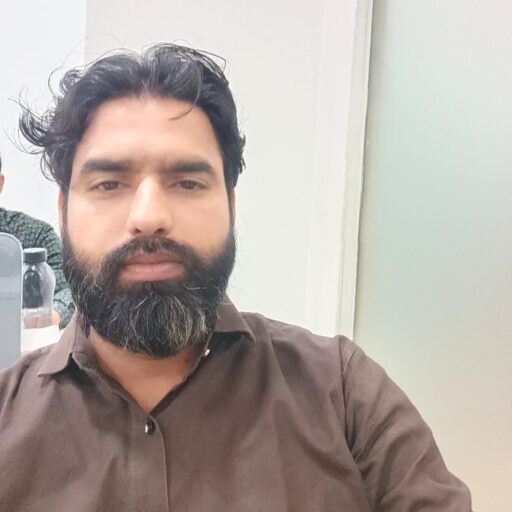
C Sharp Programming Instructor
Yatendra teaches c sharp programming course classes with practical one-to-one attention. His qualifications include MCA, BCA, PGDCA and A Level (NIELIT).
- Instructor: Yatendra
- Qualification: MCA, BCA, PGDCA, A Level (NIELIT)
- Phone/WhatsApp: +91 9871715299
- Email: info@computerclass.co.in
External Learning Links
These outbound links support official reference and trust.
C Sharp Programming Course FAQ
These answers help learners understand the course before joining.
What is covered in c sharp programming course?
C sharp programming course covers C# syntax, input output, conditions, loops, arrays, methods, classes, objects, constructors, inheritance, polymorphism, exception handling, collections, LINQ basics, files and project readiness.
What is the fee for this course?
The fee is Rs. 500 per 60-minute live one-to-one online class.
Can a beginner join this course?
Yes. A beginner can start from setup, first program, syntax, variables and basic logic.
Which software is required?
Visual Studio, Visual Studio Code with .NET SDK or another suitable C# environment can be used.
Will I learn OOP?
Yes. Classes, objects, constructors, inheritance, polymorphism, abstraction and interface basics are included.
Is C# useful for .NET projects?
Yes. C# is a core language for ADO.NET, ASP.NET, .NET Core MVC and SQL Server-connected projects.
Start C Sharp Programming Course Online
Send your current level, programming goal and preferred timing on WhatsApp. You will receive syllabus guidance, fee details and available timing for live one-to-one C# programming class.